Uninstall LPS before SAP
Description
If you uninstall version 9.8 of the Loftware Print Server and then try to uninstall the Loftware Connector Java-based software that establishes a high-speed connectivity bridge between UNIX-based enterprise applications and the Loftware Print Server (LPS). for SAP Applications, you will receive an error that prevent uninstallation of the Loftware Connector See Loftware Connector. for SAP Applications.
Reproduce
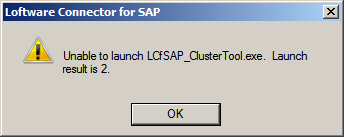
On a non-clustered system, uninstall LPS while Loftware Connector for SAP Applications is still installed. After LPS has been uninstalled, select Loftware Connector for SAP, and click Uninstall. The uninstall will fail. The error message reports that the LCfSAP_ClusterTool did not run successfully, with a return code of 2.
Workaround 1
Uninstall the Loftware Connector for SAP Applications before uninstalling the Loftware Print Server.
Workaround 2
If you have already uninstalled the Loftware Print Server:
After uninstalling LPS and before uninstalling LCfSAP, create an llmcluster.ini configuration file in the following OS specific location:
On Vista, Windows 7, and 2008
C:\ProgramData\Loftware Inc\Labeling\Config
On XP and 2003
C:\Documents and Settings\All Users\Application Data\Loftware Inc\Labeling\Config
The llmcluster.ini file must contain the following data:
[ClusterInfo]OnCluster=0ClusterChksOK=0
Result
The Loftware Connector for SAP Applications and the Loftware Print Server are uninstalled.
Article Number
2011006
Versions
Loftware Connector for SAP Applications version 2.0
Environment
LPS 9.8 and Loftware Connector for SAP Applications 2.0 installed.
Windows 2008 Server, Windows 2003 Server, Windows 7, Windows Vista, Windows XP.
