SAP Connector Rule Assignment Will Not Save - Label, Label Type or Label Group Value Reverts Back to "DEFAULT"
Description
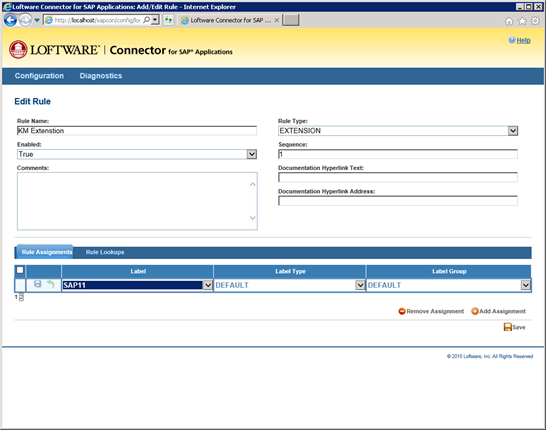
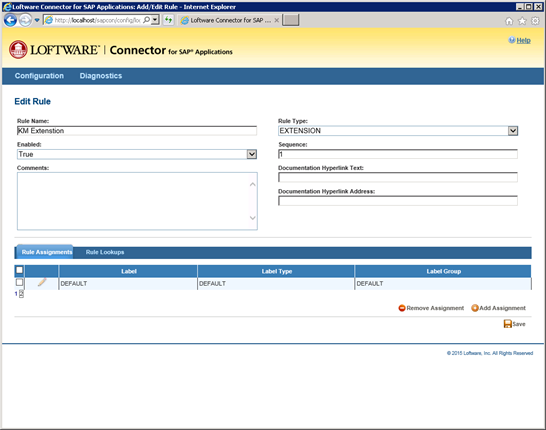
When attempting to add a new Rule Assignment to a label in the SAP Connector See Loftware Connector. Console, the Assignment is not saved, and the Label A label is a design area on the computer screen where a label format is created or edited., Label Type or Label Group A logical organization of resources. Resources are not failed from one cluster member to another, groups are. This allows the administrator to place dependent resources into one unit, which guarantees that the same cluster member always owns a resource and all its dependencies. value reverts back to the value "DEFAULT" upon hitting the Save icon.
Explanation
When adding Rule Assignments, any Assignment added to the the second page of of the Rule Assignments listing will not save. Any value chosen in the Label, Label Type, or Label Group will return to "DEFAULT" upon saving. This will occur regardless of how many lines are shown per grid page.
For example, if your Rule Assignment grid shows 10 Rule Assignments per page, you will not be able to save the 11th Rule Assignment.
Solution
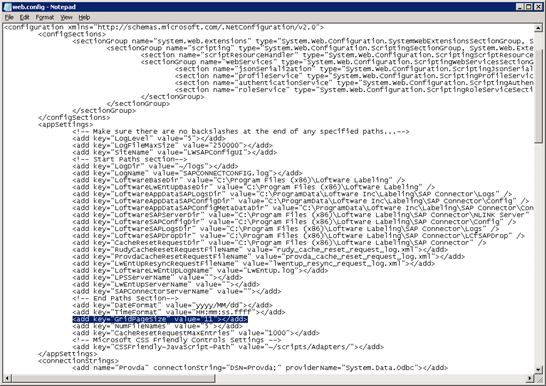
Edit the C:\inetpub\wwwroot\sapcon\web.config file, and modify the following entry to give it a value of at least the number of Rule Assignments you will need. For example, if you think you will need to add 11 Rule Assignments, then modify the file as follows;
<add key="GridPageSize" value="11"></add>
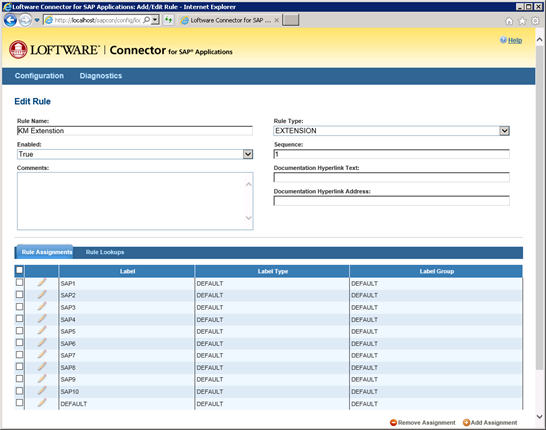
This will then display all 11 required Rule Assignments on one grid page, thereby eliminating the constraint of "second grid page saves" not being allowed.
Article Number
2015046
Versions
All supported LPS family product versions.
Environment
All supported installation environments.
