Using Label Resolution With Windows Printers
Description
Labels designed for Windows family printers can be printed to any Loftware Windows family printer, provided the label resolution is supported by the target Windows printer.
How to confirm or modify the label resolution setting for a Windows printer:
- Open the label in Design 32 and select File Media setup from the menu or press the F5 shortcut key.
- In Label
 A label is a design area on the computer screen where a label format is created or edited. Setup and Properties dialog box, make sure the Label Setup tab is selected.
 - Note the Resolution setting in the Configure Label For section.
- Clicking the drop-down icon for the Resolution field shows the available resolutions for Windows Printer selected in the Model field.
- Select the resolution that suits your printing needs.
- For printing the same label on other Windows printers of the same model, a common resolution setting is required. Refer to the additional information provided in the section after the image below.
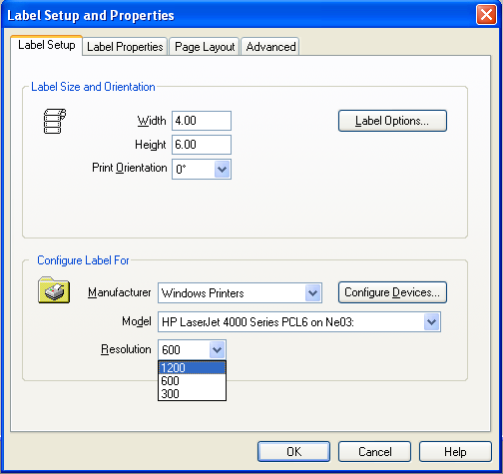
Using the correct resolution setting, it is possible to print a label to any Loftware Windows family printer that supports the selected printer. So in the above example, this label should print correctly on any Windows family printer configured in the LLM Device Configuration grid that supports a resolution of 600 dpi.
Laser printers often support multiple resolutions. So when multiple printers are involved, as long as a common resolution is selected, the label should print correctly. For example, if one laser printer supports both 300 and 600 dpi and another printer supports 600 and 1200 dpi, then the common resolution is 600 dpi. If the 600 resolution setting is selected on the label file, that label should successfully print on both printers.
If the resolution on the label is not supported by the printer, the label will most likely print either too small or too large. Using an example of two laser printers, one supporting 300/600 dpi and the other supporting 600/1200 dpi. If 300 dpi is selected as the label resolution, that label should print fine on the printer that supports both 300 and 600 dpi, but the output label will be too small on the printer that supports 600/1200. If 1200 dpi is selected as the label resolution, that label should print successfully on the printer supporting both 600 and 1200 dpi, but the output label will be too big when printed to the laser that supports only 300 and 600 resolutions.
If there is no common resolution shared between the different Windows family printers, then separate label designs, using the correct resolution, will be required for each printer.
Article Number
2016053
Versions
Any supported LPS family product environment
Environment
This table provides information that is visible only to Loftware users.
