Advanced Web Listener Configuration
Advanced Settings In Use
The contents of this document contain advanced information and settings. If you are uncomfortable with these settings, please contact Loftware Technical Support for assistance.
Update Available
These settings may not be necessary when using LPS 10.1 SP2 and higher. It is recommended that an upgrade be performed if you are experiencing issues with Web Listener.
Description
Web Listener is an internet printing program included with Loftware Print Server Premier Edition. There are some performance and reliability configurations that may be useful to some environments. This document explains these settings and how to implement them.
Overview
A solution using the Web Listener contains three components. Each component has a specific responsibilities.
Loftware Print Server (watchdognt.exe)
Responsible for generating a stream of data to send to a printer.
Push Servlet
Connection broker for the communication between LPS and Web Listener.
Web Listener Client
Receives a print stream from LPS and sends it to a printer.
Traffic Pattern
The connection over the network between the Web Listener client and the Push Servlet A generic server extension that can be loaded dynamically to expand the functionality of a web server. Servlets are commonly used with web servers and run within a Java Virtual Machine (JVM). Since servlets are all handled by separate threads within the web server process, they are very efficient and scalable. Servlets are supported on all platforms that support Java, and servlets work with all the major web servers. Loftware has developed a servlet called the LPS Web Servlet for use with the WebClient (i-Pull). See also Java Virtual Machine and WebClient (i-Pull). follows the general pattern:
- Initiate connection
- Authenticate
- Keepalive
- Transmit print stream
- Keepalive
- Close Connection
Keepalives are sent between the Web Listener client and the Push Servlet whenever there is no print stream data to send. These keepalives keep the session open and also allow the system to determine if there is a disconnection. It is possible to adjust the time between keepalives.
servletkeepalivetime
This is a setting that defaults to 30 seconds, but can be altered to give greater reliability at the cost of additional traffic.
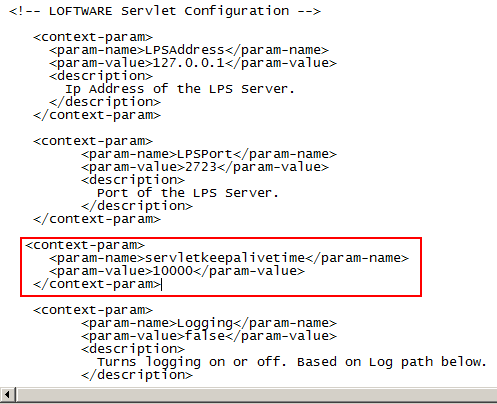
To configure the servletkeepalivetime setting, edit %TOMCAT_HOME%\webapps\loftware\WEB-INF\web.xml.
Under the XML comment "<!-- LOFTWARE Servlet Configuration -->" add the following:
It is common to add this setting after the LPSAddress and LPSPort parameters:
Additional Print Job Notifications
By default, print jobs that are submitted to the LPS system that have a Web Listener destination are notified when there is an active connection. There is a timing issue that can occur, although rare, in which a print job is stranded in a "spooled" state as seen through Loftware Status Client. The cause is a disconnect from the Web Listener that the Push Servlet has not yet processed. At the same time, a job is submitted to LPS and the LPS notifies the Push Servlet, which attempts to notify the now disconnected Web Listener. Since the Push Servlet has notified the Web Listener, when the Web Listener reconnects, it will not know to request the print stream. To alleviate this, edit the LLMWDN32.INI file. To navigate to this file, go to start > all programs > loftware labeling > configuration files. Add the following to the LLMWDN32.INI file:
Note that the [Socket] section may already exist. Do not add it again, instead, just add WaitRead=1 under the existing heading.
Article Number
2014016
Versions
LPS 10.1.1.51 (or lower)
Environment
All supported installation environments.
