Creating An Address Label That Does Not Have Blank Lines
Description
How do I create a label that does not print a blank line if no data is supplied?
Solution
Example
A typical address label has the following fields:
Name
Address 1
Address 2
City
State
Zip
If no data is available for Address 2, then this line is printed as a blank. To prevent this behavior, complete the following steps:
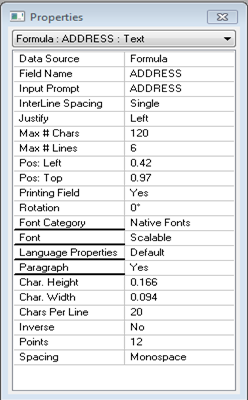
- Place a paragraph field on the label in Design.
- Set the Char per line to exactly the same number as the longest field of any of the individual address fields.
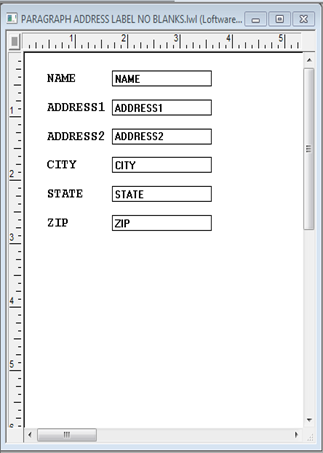
- Create address information fields in the On-Demand Print Form.(See the On-Demand Print Chapter in the Manual for more information on this.)
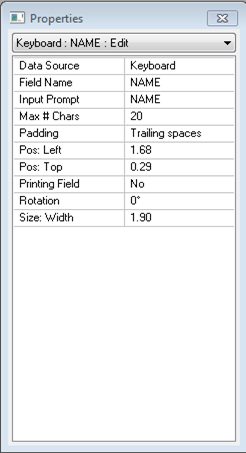
- Set each field's Padding Property in the Properties Box to "Trailing Spaces".
- If the label is connected to a database, connect the fields to the appropriate field in the database (i.e.; Address 1 in database linked to Address 1 on the On-Demand Print Form)
- Return to Label
 A label is a design area on the computer screen where a label format is created or edited. Design, Double-click on the Paragraph Field.
 - Choose "Formula" for the Data Source Where data is extracted to produce labels. Loftware Label Manager provides a variety of data sources, including the keyboard, a database, serial number, a formula, via the UCC or UPN Wizard. For RFID labels and tags, data can come from the Keyboard data source or by configuring data blocks using the Block Configuration data source..
- Add all address fields to the formula, with the operator "Combine (&)" in between each field.The formula might look something like: Name & Address 1 & Address 2 & City & State & Zip
- Save the label.
The Address Fields are printed in the sequence that is created in the formula, and if there is missing data, the fields "move up" to the next available line.
Label Design and Print.
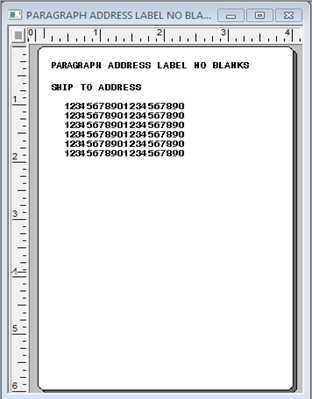
On Demand Print Form. Note that under Field Properties each is required to be Max # Chars of 20.
Article Number
2009154
Versions
All versions of Loftware
Environment
All supported installation environments.
