Error M61429 You Do Not Have the Necessary Permissions to Save the Label in this Location
Description
When opening a new label in Design32, The following error displays:
When trying to open a new label, Design 32 tries to create a shell of a label in the directory. This directory is specified under File Locations for labels. Your user does not have full privileges to this directory.
To check the location in Design 32, open Options and then File Locations:
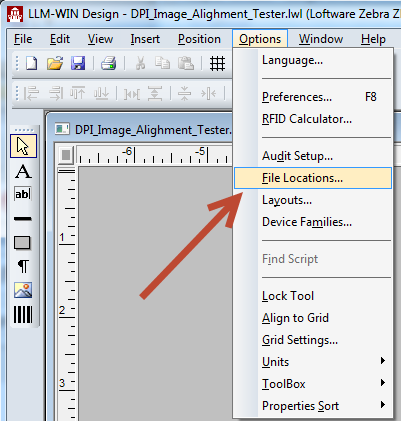
Find the path for labels. (This is where the labels are saved.)
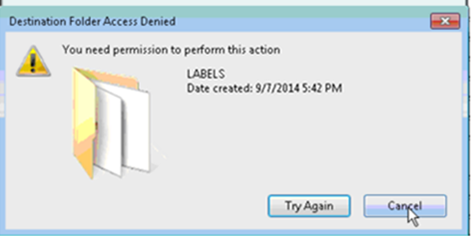
Navigate to the Labels location using Windows Explorer. When you get to the right location, try to create a file. You will probably get the following error:
Solution
There are two solutions:
- If you keep the default install directory (C:\Program Files (x86)\Loftware Labeling), you can solve this issue by adding the user to the Loftware_Group
 A logical organization of resources. Resources are not failed from one cluster member to another, groups are. This allows the administrator to place dependent resources into one unit, which guarantees that the same cluster member always owns a resource and all its dependencies..
- To access the Loftware_Group go to:
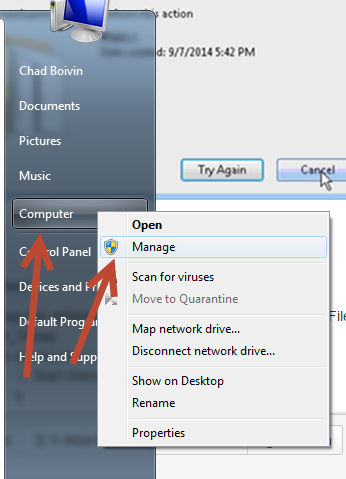
- Start Menu or Start page
- Right click on Computer and open Manage.
- Once the Computer Management displays, select Local Users and Groups and then Groups.
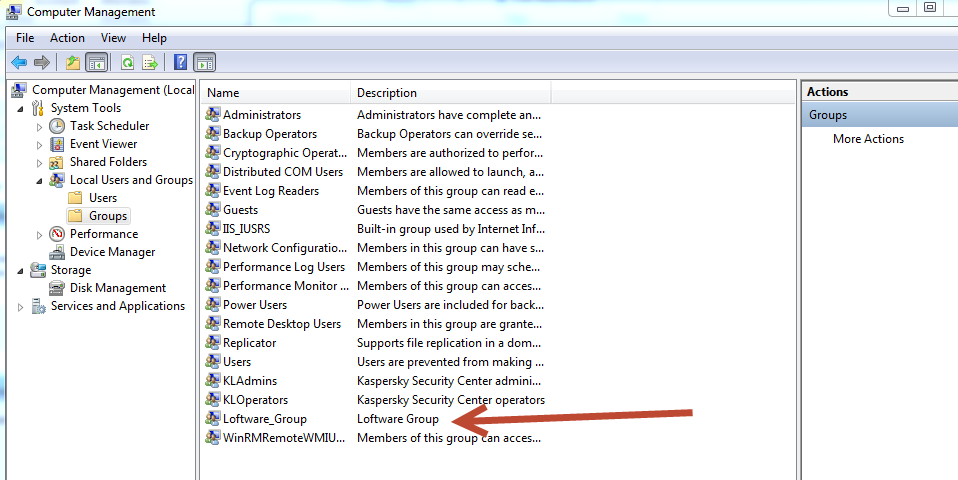
- Add the user to this group with full rights. This gives you full access to the Loftware directory and you will be able to create a new design in Design32.
- To access the Loftware_Group go to:
- If you do not save your labels in the default directory, then you need to contact the network administrator to give you full control to this directory.
Once either Step 1 or Step 2 is completed you should be able to complete a label.
Article Number
2015082
Versions
All supported LPS family product versions.
Environment
All supported installation environments.
