Error M11072 Device ID Not Found in Device List File
Message
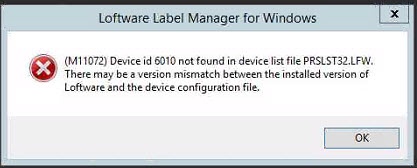
The following error message is received when attempting to launch Design 32 after upgrading the Loftware Print Server (LPS) to version 9.6 or higher.
This article was written specifically for those Device id's specified in the error message which fall between the range from 6001-6024.
(M11072) Device id 6010 not found in device list file PRSLST32.LFW. There may be a version mismatch between the installed version of Loftware and the device configuration file.
Explanation
In LPS version 8, a selection of RFID Radio Frequency Identification, a technology that uses radio waves to uniquely identify items. Typically, a reader communicates with a tag, which holds digital information in a microchip. Reader devices were added to the list of devices supported by Loftware. In Loftware version 9.6 these devices were removed. The list of the devices removed in version 9.6 are shown below:
- Device id=6001, Loftware Alien 9780 RFID
- Device id=6002, Loftware ThingMagic Mercury4 RFID
- Device id=6003, Loftware Symbol A machine readable pattern typically composed of quiet zones, start/stop or finder pattern(s), and symbol characters (which include special function and error detection and/or correction characters) required by a particular symbology. AR400 RFID
- Device id=6004, Loftware AWID MPR-2010AN RFID
- Device id=6005, Loftware AWID MPR-2012BN RFID
- Device id=6006, Loftware AWID MPR-2080AN RFID
- Device id=6007, Loftware AWID MPR-3014Q RFID
- Device id=6008, Loftware Symbol XR400 RFID
- Device id=6009, Loftware Alien 9800 RFID
- Device id=6010, Loftware Alien 8780 RFID
- Device id=6014, Loftware Intermec IF5 RFID
- Device id=6015, Loftware Intermec IP4 RFID
- Device id=6016, Loftware Alien 8800 RFID
- Device id=6017, Loftware Symbol XR480 RFID
- Device id=6018, Loftware Symbol MC9060-G RFID
- Device id=6019, Loftware Impinj Speedway RFID
- Device id=6020, Loftware Omron V750 RFID
- Device id=6021, Loftware TagSys L100 RFID
- Device id=6022, Loftware Intelleflex I-Beam RFID
- Device id=6023, Loftware Sirit Infinity 510 RFID
- Device id=6024, Loftware Seimens RF660R RFID
If any of the devices listed above were configured in the LLM Device Configuration grid, either in the Assigned range or the Unassigned range of the Device Configuration Grid, then the M11072 error will appear if:
- The existing Loftware installation is upgraded to version 9.6 or higher.
- The existing printer configuration files, printer32.ini & printr32.cfg, are copied to a new server as part of Loftware LPS migration and upgrade to version 9.6 or higher. This step is a typically used in LPS migrations to a new server to quickly move all the Loftware printer configuration information from the old installation to the new server/installation.
Solution
-
If upgrading to Loftware version 9.6 through 10.x, the devices shown above should be removed from the LLM Device Configuration grid prior to performing the upgrade. If this step can not be accomplished then contact Loftware's Technical Support group for assistance.
-
If upgrading to Loftware version 11, then use the feature for "Importing a Printer Group
A logical organization of resources. Resources are not failed from one cluster member to another, groups are. This allows the administrator to place dependent resources into one unit, which guarantees that the same cluster member always owns a resource and all its dependencies.". (Design 32 | File | Manage Groups... | Import). Help is available on this feature. ( Design 32 | Help | Loftware Label A label is a design area on the computer screen where a label format is created or edited. Manager User Guide | Contents tab | Managing LPS Printer Groups | Importing a Printer Group)
Article Number
2016056
Versions
Loftware Print Server versions 9.6 and higher
Environment
All supported LPS environments
Applies to Device ids: 6001-6024
