Error Device Instance Handle Does Not Correspond to the Present Device
Description
When trying to start the Loftware Print Server Service in version 10.0.2.88 the following error occurs:
Solution
What is the registry key value at this location HKEY_LOCAL_MACHINE\SYSTEM\CurrentControlSet\Services\WatchDogNT\ImagePath? You need to make sure that the value for this key is the same for the location of the exe for the windows service, which is WatchdogNT.exe
How to Implement the Solution
If this error occurs, the first thing you need to do is navigate to your install directory and remember the path of your WatchDogNT.exe.
If you took the defaults during the install, then the WatchdogNT.exe should be installed in the following directory:
- On a 64 bit operating system - C:\Program Files (x86)\Loftware Labeling\WatchdogNT.exe
- On a 32 bit Operating system - C:\Program Files\Loftware Labeling\WatchdogNT.exe
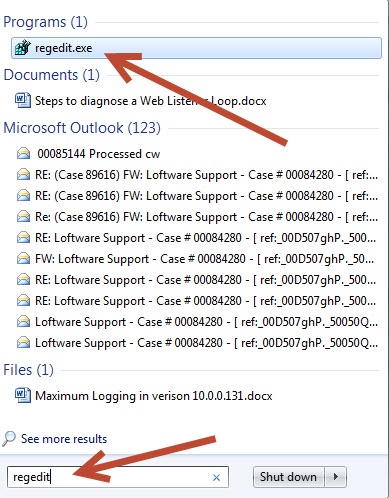
Navigate to the start menu, and type in regedit to bring up your registry editor.
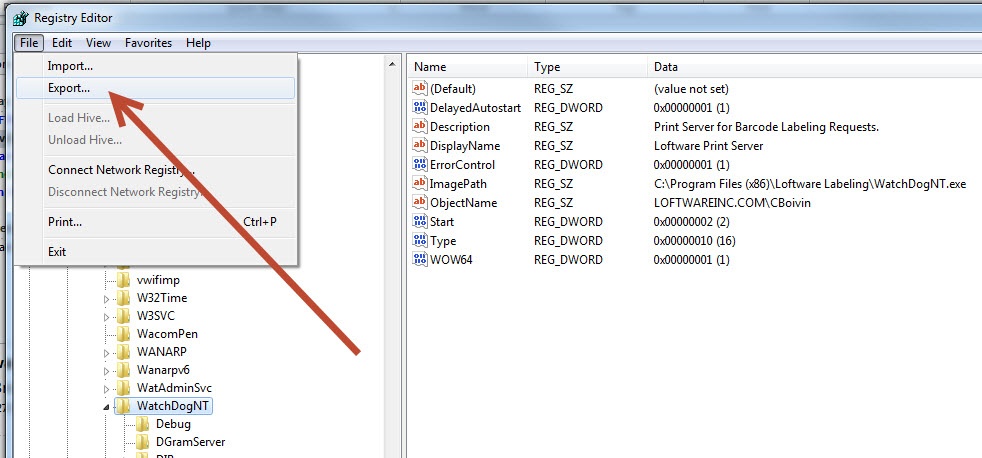
Once the Registry Editor box opens, click File export, and save the file somewhere you will remember, so you have a backup.
Note: Any time you make changes to the Registry settings you should always do an export as a back up.
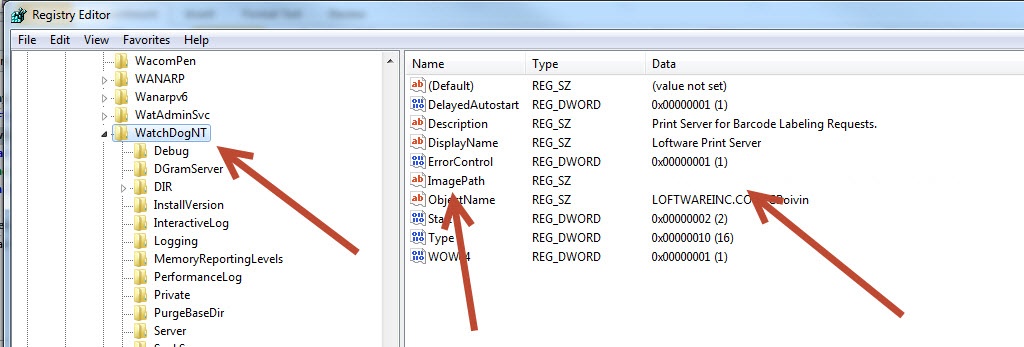
In the registry editor box please navigate to the following area HKEY_LOCAL_MACHINE\SYSTEM\CurrentControlSet\Services\WatchDogNT
Once in this location find the Entry called ImagePath. At this point you will probably see one of two things; a blank entry, and/or an entry that does not match the install path of the WatchDogNT.exe
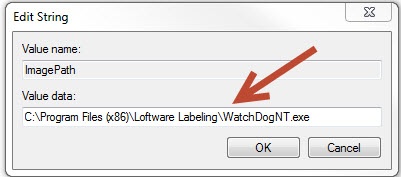
Double click the ImagePath and the edit String box should open. In the Value data add the location of the WatchdogNT.exe
As previously stated, the default install on a 64bit operating system should look like the following:
Click OK, and now you can close the Registry Editor. do a restart of the server Once the server is restarted then you can start the service and the service should start right up.
Article Number
2013108
Versions
LPS/LLM 10.0.2.88
Environment
Server 2008R2
