How to Control Column Order Returned by an ODBC Lookup
Description
Often a user must quickly review the returned ODBC data rows to determine which record to print. If the data column used for verification is not visible immediately, it can waste time for the user to horizontally scroll to the right to find the necessary column. This can be corrected on existing labels but if planning is done in advance all the columns can be arranged in the optimal order.
How to control the order of the columns returned by an ODBC lookup
Let’s look at an address label as an example. We’ll use the Store ID as the database key and the rest of the data will come from an ODBC data source.
Adding the fields in this order initially seems to make sense:
Field Name Database Column
- Customer ID (Store ID)
- Customer Name (StoreName)
- Street Address 1 (Address)
- City (City)
- State (StateOrProvince)
- Postal Code (PostalCode)
- Phone (Phone)
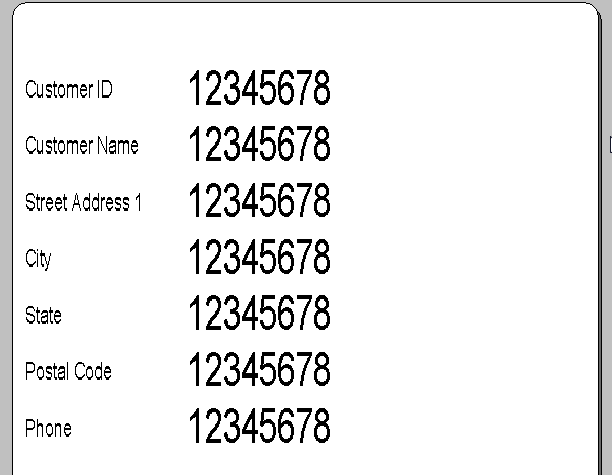
Fig.1: It seems to make sense to place the fields on your label in this order...until you see how the following data is returned from ODBC.
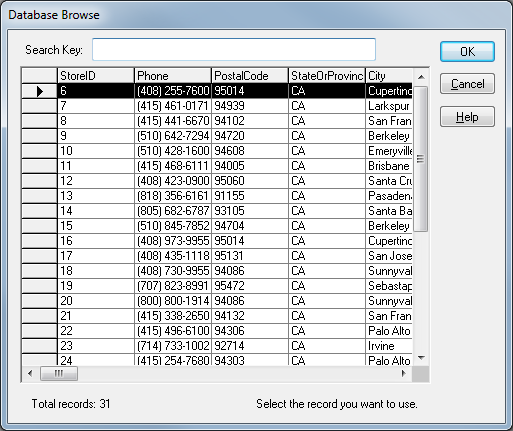
Fig.2: If the user needs to check the StoreName column to make sure they have the correct address, they must horizontally scroll the database table all the way to the right.
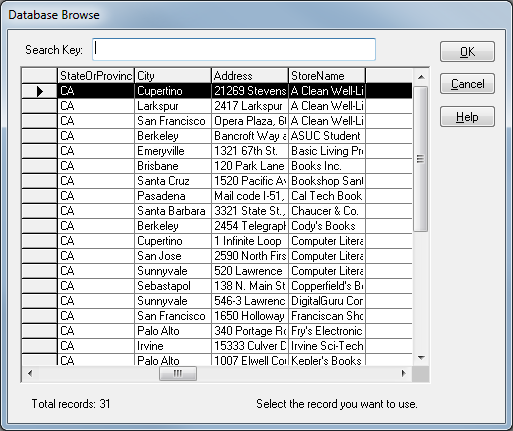
Fig.3: You can correct the column-order after you have already placed the fields on your label by simply removing the label field linked to the StoreName column (Customer Name) and re-adding it.
Always the last field added
The column that is to the right of the key field column is always the last field added.
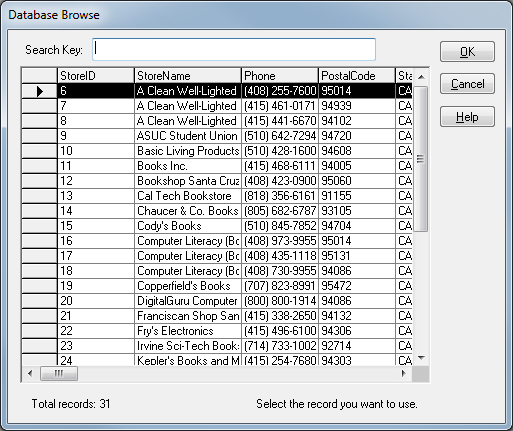
Fig.4: To get all the columns in the order you want, you can plan ahead and add them in the reverse order as shown in the following example.
Order they were placed on your label
The order in which you attach them to the database does not matter. Only the order they were placed on your label matters.
Summary
ODBC data columns are returned in the reverse of the order that the associated fields were added to the label.
Article Number
2017053
Versions
All currently supported version of Loftware
Environment
LPS family label format using Microsoft ODBC 32 bit
