Loftware Edge Client
Note
Loftware Edge Client is available with the alternative version of Loftware Cloud, where your Control Center’s URL starts with one of the following:
https://eu-app.loftware.io/
https://us-app.loftware.io/
https://ap-app.loftware.io/
The alternative version of Control Center also contains theLoftware Edge Client download icon:
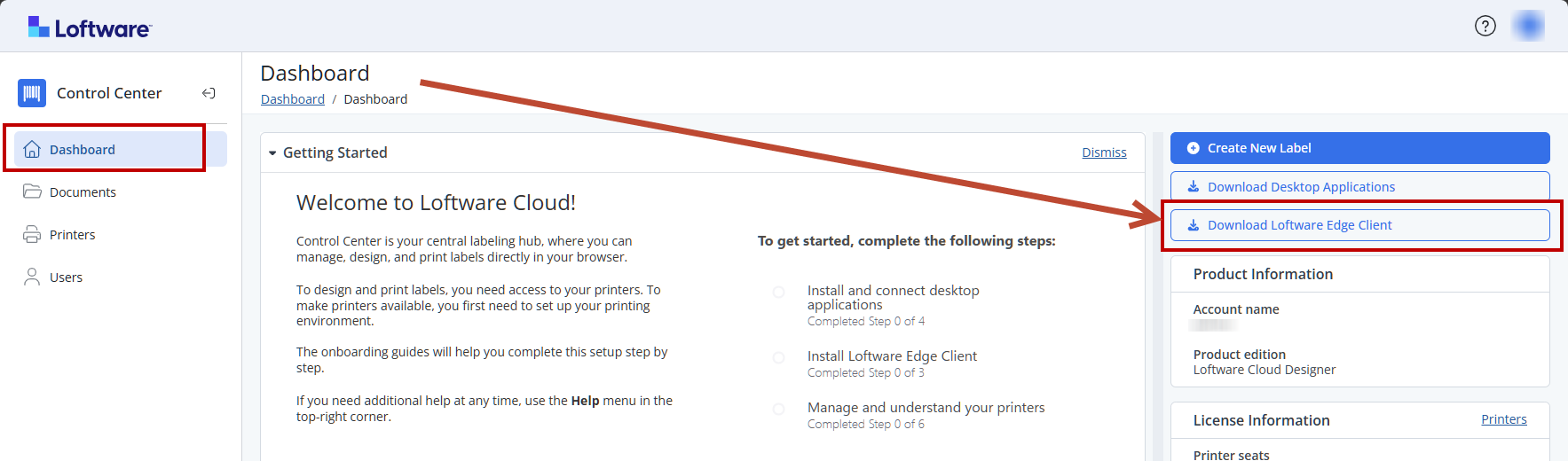
Loftware Edge Client is a lightweight local service that connects Loftware Cloud to on-prem printers.Loftware Edge Client runs in the background and enables browser-based printing by making local and network printers available in Control Center’s Documents storage.
Install Loftware Edge Client on a workstation or terminal in the business process where labels are printed. Loftware Edge Client works with local or network printers.
Before installing Loftware Edge Client, make sure that:
-
The workstation is approved by your organization.
-
You have permission to install software.
-
The required printer is available.
-
You can access the assigned Loftwareenvironment.
-
The correct printer driver is installed
-
The selected printer is online and ready.
To install and validateLoftware Edge Client on your workstations:
-
Open Dashboard in yourControl Center, then click Download Loftware Edge Client.
-
When the download is completed, go to your Downloads folder and run the LoftwareEdgeClient.exe application.
-
Follow the setup wizard. Accept the license terms and complete the installation.
 more
more